
Critical PHP Security Vulnerability in 2026: What Website Owners Need to Know
PHP2Shell affects the PHP runtime behind WordPress, Laravel, and other PHP websites. Learn how to verify your PHP security patch, restart workers, and test your site safely.
Quick answer: PHP2Shell is the name given to two critical flaws in PHP itself, CVE-2026-109618 and CVE-2026-109619, fixed on October 21, 2026. WordPress, Laravel, and many other websites and applications run on PHP, so an unpatched server can let an attacker run code without logging in, and security companies reported exploit attempts within hours of the fix. Updating WordPress, Laravel, Composer dependencies, themes, or plugins alone does not fix it. Your site is covered only when the PHP build serving the live website is PHP 8.5.12, 8.4.27, 8.3.36, 8.2.35, or later in the same branch, or a vendor build your host confirms includes both fixes, and the PHP processes have been restarted. This guide shows how to check, what to ask your host, how to test your site afterwards, and which signs of compromise to look for.
What Is PHP2Shell, and Is It Being Exploited?
PHP2Shell is the nickname for two vulnerabilities in the PHP runtime, the server-side language that WordPress, WooCommerce, Laravel, Drupal, Joomla, Magento, and many custom applications run on. The PHP project rates both as critical, with a CVSS v4.0 score of 9.2, and says they can allow unauthenticated remote code execution: someone who has never logged in can make your server run their code.
In plain terms, both bugs involve PHP mishandling memory while it processes web requests. With CVE-2026-109618, an out-of-memory error interrupts PHP while a request is only partly set up, and the cleanup step then treats the half-built data as valid. With CVE-2026-109619, data from one request outlives the memory it was stored in, and a later request handled by the same PHP worker reuses it. Attackers can trigger both conditions on purpose with crafted requests.
The flaws were reported by Wiz Research, Calif, and OpenAI's Codex Security team. Details leaked publicly on October 20, so the PHP project moved its release forward and published fixed versions on October 21 at about 14:00 UTC. Wiz says it demonstrated pre-authentication code execution against default WordPress, Drupal, and Joomla installations. PHP itself is vulnerable, so Laravel and other PHP sites are in scope too; the demonstration against WordPress does not mean only WordPress is affected.
Exploit attempts started quickly. Cloudflare said it observed attack traffic against its customers and saw attackers changing their payloads to get around its new firewall rules. Sansec, citing Cloudflare, puts the first attacks at 07:43 UTC on October 21, before the official fix was released, and watchTowr reported active exploitation attempts against both CVEs that afternoon. Other responders were more cautious: Huntress said it had not seen in-the-wild exploitation on its partners' systems as of October 21, and the Netherlands' National Cyber Security Centre said it had not yet seen the flaws abused. Sansec's assessment is blunt: "We expect mass exploitation now that the patch and the writeups are public."
- Vulnerable software: the PHP runtime, not WordPress core, themes, or plugins.
- CVE IDs: CVE-2026-109618 (remote code execution via out-of-memory corruption) and CVE-2026-109619 (remote code execution via stale global state).
- Severity: critical, CVSS v4.0 9.2 for both, according to the PHP project.
- Affected setups: every PHP installation serving web requests, including PHP-FPM, Apache with mod_php, php-cgi, FrankenPHP, and LiteSpeed. The PHP project considers mod_php the highest risk.
- The fix: a patched PHP build, followed by a restart of every PHP worker process.
Which PHP Versions Fix PHP2Shell?
The PHP project published four fixed releases on October 21, 2026. A server is covered only when its PHP build is at or above the fixed release for its own branch. "PHP 8" or "PHP 8.3" is not enough information; you need the full version number.
Version numbers from Linux distributions need extra care. Debian, Ubuntu, Red Hat, and similar vendors often keep an older PHP version number and add security fixes to it. Ubuntu 24.04, for example, ships PHP 8.3.6 and delivers later security fixes as package updates numbered 8.3.6-0ubuntu0.24.04.x. That means 8.3.6 is not automatically vulnerable, and not automatically safe. The PHP project says distributions received the patches in advance, so the answer is in your vendor's security notice or package changelog, not in the version number alone.
Plan past this week, too. WordPress recommends PHP 8.3 or newer. PHP 8.2 stops receiving security fixes on December 31, 2026; PHP 8.3 is supported until December 31, 2027, PHP 8.4 until December 31, 2028, and PHP 8.5 until December 31, 2029. If a site is still on PHP 8.2 or older, use this patch as the start of a planned upgrade.
- PHP 8.5: 8.5.12 or later.
- PHP 8.4: 8.4.27 or later.
- PHP 8.3: 8.3.36 or later.
- PHP 8.2: 8.2.35 or later, with end of life on December 31, 2026.
- PHP 8.1, 8.0, and 7.4: no official release. The PHP project published minimal source backports, and some distributions and long-term support vendors ship patched builds. Get written confirmation from your host.
- PHP 7.3 and older: no fix from the PHP project, and current WordPress versions require PHP 7.4 or newer. Upgrade.
Does PHP2Shell Affect Laravel and Other PHP Websites?
Yes. Laravel applications, custom PHP sites, and platforms such as Drupal, Joomla, Magento, and WooCommerce can all be exposed if the PHP runtime handling their requests is unpatched. PHP2Shell is not a vulnerability in Laravel or WordPress itself. Upgrading Laravel, running composer update, or deploying new application code does not replace the vulnerable PHP interpreter.
For Laravel, check the full PHP version and vendor patch status of the actual web-serving runtime, usually PHP-FPM behind Nginx or Apache, or PHP running in a container. The php -v command shows the CLI version, which can be different from production web requests. Use your hosting panel, PHP-FPM package or container image information, or a written confirmation from your infrastructure provider. Check production and staging separately.
Apply a fixed PHP build or a vendor-confirmed backport, then restart or recreate every affected PHP web worker. If your app runs in Docker, update the base image and redeploy affected containers. Afterward, test the app's key workflows and review server-side logs for unusual activity as described later in this guide.
Laravel queue workers, Horizon, Octane, scheduled tasks, and other long-running PHP processes may also need restarting or reloading to use the patched runtime. Follow the deployment instructions for your Laravel version and hosting platform. Restarting background workers is not a substitute for patching PHP-FPM or other web-serving PHP processes.
- Managed Laravel hosting: ask which PHP build handles production web requests and whether both PHP2Shell CVEs are fixed.
- Laravel on a VPS: update PHP and PHP-FPM through your operating system vendor, verify the patch, and restart PHP-FPM.
- Laravel in Docker: rebuild with a patched PHP base image and redeploy affected containers, checking web and worker images separately.
- Regression tests: verify sessions and authentication, forms and uploads, API routes, payments, queues, scheduled jobs, and error logs.
- Other PHP frameworks and custom apps: follow the same PHP runtime, patch, worker restart, and regression-test checks. Updating only application dependencies does not fix the interpreter.
How to Check Your PHP Version in WordPress
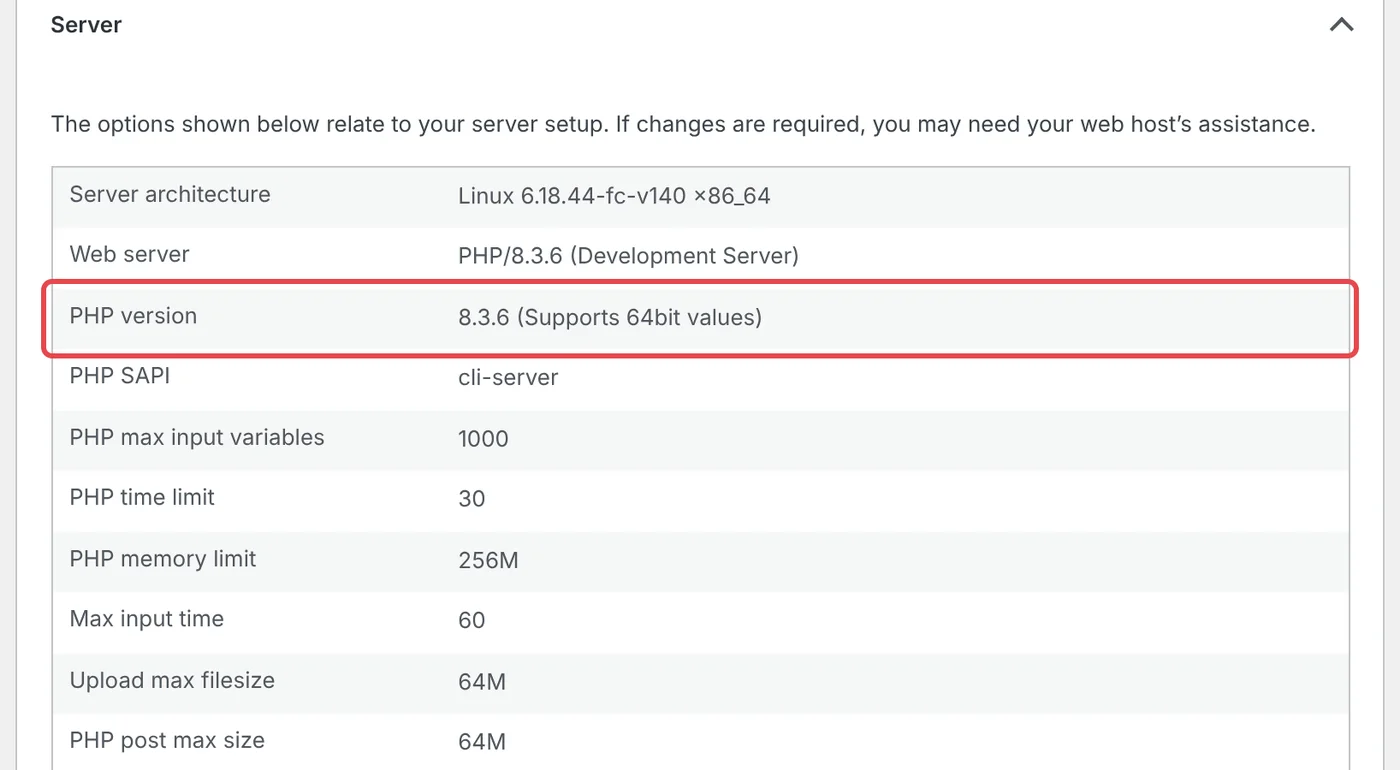
You can see which PHP version your website uses without changing anything. Log in to WordPress as an administrator, go to Tools → Site Health, open the Info tab, and expand the Server panel. The PHP version row shows the PHP build that served that admin page.
Write down the full version and which site you checked. Check the live production site, not just a staging copy, because staging and production often run on different servers or PHP versions. If you manage several websites, check each one.
Treat the number as the start of the check, not the end. If it is below the fixed release for its branch, the site needs an update. If it looks like a distribution build, as in the screenshot below, or your host patches PHP centrally, confirm the status with your host using the message at the end of the next section.
- WordPress: Tools → Site Health → Info → Server → PHP version.
- Hosting control panel: look for PHP Version, Select PHP Version, MultiPHP Manager, or PHP Settings for your domain.
- Command line (VPS or dedicated server): php -v reports the command-line PHP, which can differ from the PHP serving web traffic. Rely on Site Health and the PHP-FPM or Apache package version instead.
- Several sites: keep one list of each domain, environment, PHP version, and date checked.
How to Get PHP2Shell Patched on Your Hosting
Who installs the fix depends on how your website is hosted. Updating WordPress core, a theme, or a plugin does not replace the PHP runtime underneath it. Find your setup below.
Whoever applies the update, the job is done only when three things are true: the installed PHP package includes both CVE fixes, every affected PHP worker has been restarted, and the live web-serving PHP build is verified as patched (via WordPress Site Health, your server, or your host).
- Shared or managed WordPress hosting: the host patches PHP. Send the message at the end of this section. If the host lets you choose a PHP version, switch only to a branch it confirms is patched, preferably 8.3 or newer.
- VPS or dedicated server, step 1: install your distribution's PHP security update with apt on Debian and Ubuntu or dnf on Red Hat-based systems.
- VPS or dedicated server, step 2: confirm the fix is in the installed package. On Debian and Ubuntu, zgrep CVE-2026-109618 /usr/share/doc/php8.3-fpm/changelog.Debian.gz (adjust 8.3 to your branch) should return a match. On Red Hat-based systems, use rpm -q --changelog php-fpm | grep CVE-2026-109618.
- VPS or dedicated server, step 3: restart PHP with sudo systemctl restart php8.3-fpm (adjust the version), and restart Apache with sudo systemctl restart apache2 if it runs PHP through mod_php. An updated package on disk does not protect workers still running the old code.
- Docker or container hosting: pull an updated base image with a fixed PHP build, rebuild your images, and recreate the running containers. A running container keeps the PHP version it started with.
- Servers using the Remi repository: the PHP project warned that rpms.remirepo.net would not have updates on release day and recommended switching to distribution packages or building from source.
- Agency- or developer-managed sites: ask for written confirmation of which servers were patched and when.
- Everyone else: copy the message below, send it to your host or developer, and keep the written reply with your maintenance records.
Hi, please confirm whether the PHP build serving [your domain] in production is patched for PHP2Shell (CVE-2026-109618 and CVE-2026-109619). Which PHP version and build is active, when was it deployed, and have all PHP workers been restarted since? If it is not patched yet, what is the timeline, and what temporary protections are in place until then?
Why a WordPress Update, Security Plugin, or WAF Is Not Enough
Most WordPress security tools run inside WordPress. The PHP project says the demonstrated mod_php exploit lets an unauthenticated request trigger the attack before any application code runs, which means before WordPress, its security plugins, or its login protection have loaded. Sansec likewise notes that WordPress maintenance mode does not help, because the flaw is in the PHP engine.
Network-level firewalls are more useful while you wait for a patch. Cloudflare deployed PHP2Shell rules automatically on every plan with its web application firewall (WAF) enabled, including the Free plan, and Wiz notes that Fastly and Imperva also offer mitigations. A firewall only inspects traffic routed through it, though. If attackers can reach your server's IP address directly, they bypass it. Cloudflare's own guidance is that customers should still patch PHP.
Use these layers to buy time, not as the fix.
- WordPress core, theme, and plugin updates: still worth doing, but they do not change the PHP runtime.
- Security plugins and maintenance mode: they run after PHP has already started processing the request, so you cannot rely on them here.
- Cloudflare or another WAF: helpful while you patch, but only for traffic that passes through it.
- Patched PHP with restarted workers: the only complete fix, according to the PHP project.
If You Cannot Patch Today: Temporary Mitigations
The PHP advisory lists configuration changes that reduce exposure to the known attack paths while an update is scheduled. The PHP project is explicit that they "reduce exposure to specific attack paths but do not make an installation safe." These are server-level settings, so on shared or managed hosting, ask your host to apply them rather than editing files yourself.
Settings applied through ini_set(), .user.ini files, or wp-config.php are not reliable for these mitigations. The advisory says they must apply before PHP parses the request, so they belong in php.ini, the PHP-FPM pool, or the web server configuration. Hiding errors with display_errors or error_reporting does not help either. Record every temporary change and remove it once PHP is updated.
- Turn off session upload progress: set session.upload_progress.enabled=0 and restart every PHP worker. WordPress core does not use PHP sessions, so this change is low-risk for most sites.
- Lower post_max_size: the advisory suggests 8M for applications without uploads and 32M when uploads are needed, with upload_max_filesize below it. On WordPress this limits media and plugin uploads, so large videos or theme packages will fail until you raise it again.
- Remove the controllable memory limit: set memory_limit=-1 so applications cannot override it, for example with php_admin_value in the PHP-FPM pool. Keep a container or cgroup memory limit in place as the safety net, and do not use RLIMIT_AS or RLIMIT_DATA instead; the advisory says those can trigger the vulnerable failure.
- PHP 8.5 only: set fatal_error_backtraces=0 and restart every worker.
- Web server rules: Sansec suggests temporarily blocking multipart/form-data requests at the web server, but that also breaks file uploads and some forms. Test checkout, forms, and the media library afterwards.
How to Test Your WordPress Site After a PHP Update
A security patch within the same PHP branch rarely breaks a website, but a move to a newer branch, such as 8.1 to 8.3, can expose compatibility problems in older plugins or custom code. Regression testing means confirming the site still does what it should after the change.
Test the paths that matter to customers and revenue first. A working homepage does not prove that forms, payments, logins, and integrations still work. Test on the live site after deployment, using safe test data and your payment provider's test options.
- Open the homepage and your most important pages on desktop and mobile.
- Submit a contact or quote form and confirm the message arrives in the right inbox or CRM.
- Test logging in, password reset, search, and any members-only pages.
- For WooCommerce or other online stores, check product pages, cart totals, checkout, and the order confirmation email with an approved test order.
- Upload an image to the media library, and test booking tools, multilingual pages, and other integrations you rely on.
- Check Tools → Site Health → Status for new critical issues, and review the PHP error log for new warnings or fatal errors.
- Confirm that scheduled jobs such as backups, email sends, and feed syncs still run.
How to Check Whether Your WordPress Site Was Compromised
Patching closes the door; it does not tell you whether someone got in before it closed. Because details leaked on October 20 and attacks were reported from October 21, review activity from October 20 onward.
PHP2Shell-specific signs are mostly in server logs, which you or your host may need to retrieve. Wiz suggests looking for unusual multipart (upload-style) requests followed by memory-limit errors or repeated HTTP 500 responses, unexpectedly large or malformed PHPSESSID cookies, and unexplained PHP worker restarts. Huntress suggests watching for PHP or web server processes launching shells or download tools such as sh, bash, curl, or wget.
Next, look for what attackers typically leave behind on WordPress sites. Repeated failed logins and random scanning are normal background noise on any public website; focus on unexplained changes and successful activity.
If you find credible signs of compromise, preserve the logs and a full copy of the site before cleaning anything, and involve your host or an incident responder. Wiz also described a memory-disclosure path in PHP2Shell that can expose data held in PHP's memory, so after a confirmed or likely compromise, rotate the database password, WordPress security keys and salts, administrator passwords, and API keys for payment, email, and other connected services. A clean scan reduces uncertainty, but it does not prove a server was never accessed.
- Server logs: POST requests with multipart bodies to unexpected URLs, followed by "Allowed memory size exhausted" errors or bursts of 500 responses.
- Processes (VPS): PHP-FPM, Apache, or php-cgi processes starting sh, bash, curl, wget, python, or perl.
- Users → All Users: administrator accounts you do not recognize.
- Plugins: plugins you did not install, and anything new in wp-content/mu-plugins.
- Files: PHP files inside wp-content/uploads, and unplanned changes to wp-config.php, .htaccess, or theme files.
- Scheduled tasks: new server cron jobs or unfamiliar scheduled events.
- File integrity: wp core verify-checksums and wp plugin verify-checksums --all compare files with the official WordPress.org copies. Premium and custom plugins need a separate review.
PHP2Shell vs. wp2shell: Two Different Problems
The names are similar, but these are separate issues. wp2shell (CVE-2026-63030 and CVE-2026-60137) was a pre-authentication remote code execution chain in WordPress core, disclosed on July 17, 2026. It was fixed in WordPress 7.0.2, 6.9.5, and 6.8.6, and Wiz reported attackers using it to install webshells. PHP2Shell is in PHP, so it affects WordPress and every other PHP application on an unpatched server.
Check both. Confirm WordPress is on a current release under Dashboard → Updates, and confirm the PHP runtime is patched as described above. A site that is up to date on WordPress can still be exposed through PHP, and the reverse is also true.
Your PHP2Shell Action Checklist
Work through the list in order. Assign one person to confirm the PHP patch and another to test the website, and keep a short written record of what was checked, by whom, and when.
- Today: record the production PHP runtime version of every live WordPress, Laravel, and other PHP application; send your host the confirmation request; and enable your WAF provider's managed protections if available.
- As soon as the fix is available: patch PHP, restart the affected workers, and verify the version serving live requests (via Site Health for WordPress).
- Same day: run relevant regression tests on forms, logins, checkout, uploads, APIs, and background jobs.
- This week: review web and application logs, accounts, plugins or dependencies, and changed files from October 20 onward; investigate credible findings.
- Before December 31, 2026: move any site on PHP 8.2 or older to PHP 8.3 or newer.
- Ongoing: keep a named owner for server updates, tested backups, and uptime and security monitoring.
Verified references
Sources & Methodology
Facts in this guide were first checked on October 22, 2026; the guidance for Laravel and other PHP applications was reviewed on October 24, 2026. Exploitation reports, vendor patches, and hosting statements are changing quickly, so confirm current status with the PHP project and your hosting provider. The WordPress screenshot comes from a local WordPress 7.1.3 test site. This article is general technical guidance, not a finding that any particular website was compromised.
- Security advisory: Critical remote code execution vulnerabilities, update nowPHP Project: Primary advisory, fixed versions, affected setups, and temporary mitigations, October 21, 2026.
- Upcoming Critical PHP Security ReleasePHP Project: Advance notice confirming both vulnerabilities are rated CVSS v4.0 9.2, October 20, 2026.
- Supported VersionsPHP Project: Security support end dates for PHP 8.2 through 8.5.
- PHP2Shell: AI uncovers critical RCE vulnerabilitiesWiz Research: Technical analysis, WordPress demonstration, and detection guidance, October 21, 2026.
- Cloudflare deploys protections against php2shell vulnerabilityCloudflare: WAF rules for all plans and observed attack traffic, October 21, 2026.
- PHP2Shell: Critical PHP RCE (CVE-2026-109618, CVE-2026-109619)Sansec: Attack timeline and stopgap guidance for WordPress and Magento store owners.
- Rapid Response: php2shell, Leaked Critical PHP VulnerabilitiesHuntress: Leak timeline, exploitation observations, and process-level detection guidance.
- PHP Issues Emergency Patches for Two Critical PHP2Shell RCE FlawsThe Hacker News: Disclosure timeline, researcher credits, and statements from watchTowr and the Dutch NCSC.
- PHP2Shell operational informationNational Cyber Security Centre, Netherlands: Operational summary and mitigation guidance.
- Exploitation in the Wild of wp2shellWiz Research: The separate July 2026 WordPress core vulnerability.
- WordPress 7.0.2 ReleaseWordPress.org: Security release fixing wp2shell.
- RequirementsWordPress.org: Recommends PHP 8.3 or greater.
- Laravel deployment documentationLaravel: Official Laravel deployment and long-running worker reload guidance.
- Critical Vulnerabilities in PHP (PHP2Shell)Cyber Security Agency of Singapore: Recommends applying PHP security patches across all internet-facing PHP systems; updated October 23, 2026.
- Site Health ScreenWordPress Documentation: Where WordPress reports server and PHP details.
- wp core verify-checksumsWordPress Developer Resources: Official WP-CLI command documentation.
- wp plugin verify-checksumsWordPress Developer Resources: Official WP-CLI command documentation.
Clear answers before you plan
Frequently Asked Questions
What is PHP2Shell?
PHP2Shell is the nickname for two critical vulnerabilities in the PHP runtime, CVE-2026-109618 and CVE-2026-109619, fixed on October 21, 2026. Both are rated CVSS v4.0 9.2 and can allow an attacker to run code on an unpatched server without logging in.
Is PHP2Shell a WordPress vulnerability?
No. It is a vulnerability in PHP, the language WordPress runs on, so any WordPress site on an unpatched PHP server is exposed. Wiz demonstrated the attack against default WordPress installations. Updating WordPress alone does not fix it.
Are Laravel and custom PHP websites affected?
Yes. The flaws are in PHP itself, which Laravel and many custom PHP applications use. Laravel or Composer updates alone do not fix the underlying interpreter. Confirm the patched web-serving PHP build, restart PHP workers and relevant long-running services, and test critical functionality.
Which PHP version fixes PHP2Shell?
PHP 8.5.12, 8.4.27, 8.3.36, and 8.2.35, or any later release in the same branch. Linux distributions and hosting providers may ship patched builds under older version numbers, so ask your host to confirm both CVEs are fixed in the build serving your live site.
Is PHP2Shell being exploited?
Exploit attempts were reported on October 21, 2026 by Cloudflare and watchTowr, including attempts before the fix was released. Some responders had not yet seen successful attacks on the systems they monitor, but working techniques and technical write-ups are public, so treat the update as urgent.
Will a WordPress security plugin or Cloudflare protect my site?
A security plugin cannot be relied on, because the PHP project says the attack can fire before any application code, including WordPress and its plugins, runs. Cloudflare's WAF rules help for traffic routed through Cloudflare, but direct traffic to your server bypasses them. Patching PHP is the only complete fix.
My host shows PHP 8.3.6 or 7.4.33. Am I vulnerable?
The number alone cannot tell you. Those versions are below the official fixed releases, but distributions and hosts often add security fixes to older version numbers. Ask your host whether CVE-2026-109618 and CVE-2026-109619 are patched in your production build. If they cannot confirm it, treat the site as vulnerable.
Do I need to restart PHP after updating?
Yes. Restart PHP-FPM, and Apache if it runs PHP through mod_php. Workers that started before the update keep running the old, vulnerable code until they are restarted. Managed hosts normally handle this, but it is worth asking them to confirm.
Is PHP2Shell the same as wp2shell?
No. wp2shell was a July 2026 flaw in WordPress core, fixed in WordPress 7.0.2, 6.9.5, and 6.8.6. PHP2Shell is in PHP itself. A WordPress site needs both a current WordPress release and a patched PHP runtime.
Does an outdated PHP version mean my website was hacked?
No. It means the server may be exposed. Patch first, then review logs, administrator accounts, plugins, and recently changed files from October 20 onward, and investigate credible signs rather than assuming a compromise.
A practical next step
Need help checking or patching a PHP-powered website?
Conduit Code Labs works on PHP-powered websites and applications, including WordPress and custom development. We can help verify patch status with your host, plan a safe PHP upgrade, and test the forms, logins, APIs, checkout, and background jobs your business depends on.

About the author
Wayne Pastoral
Full-stack developer behind Conduit Code Labs, working across Shopify, WordPress, web applications, performance, accessibility, and integrations.
Learn more about WayneContinue reading
More from Web Development
Node2Shell (CVE-2026-111497): What Node.js Teams Need to Patch and Check
Node2Shell (CVE-2026-111497) is a Brotli flaw in Node.js itself. See which versions fix it, which apps are exposed, and how to patch servers and containers.
Read article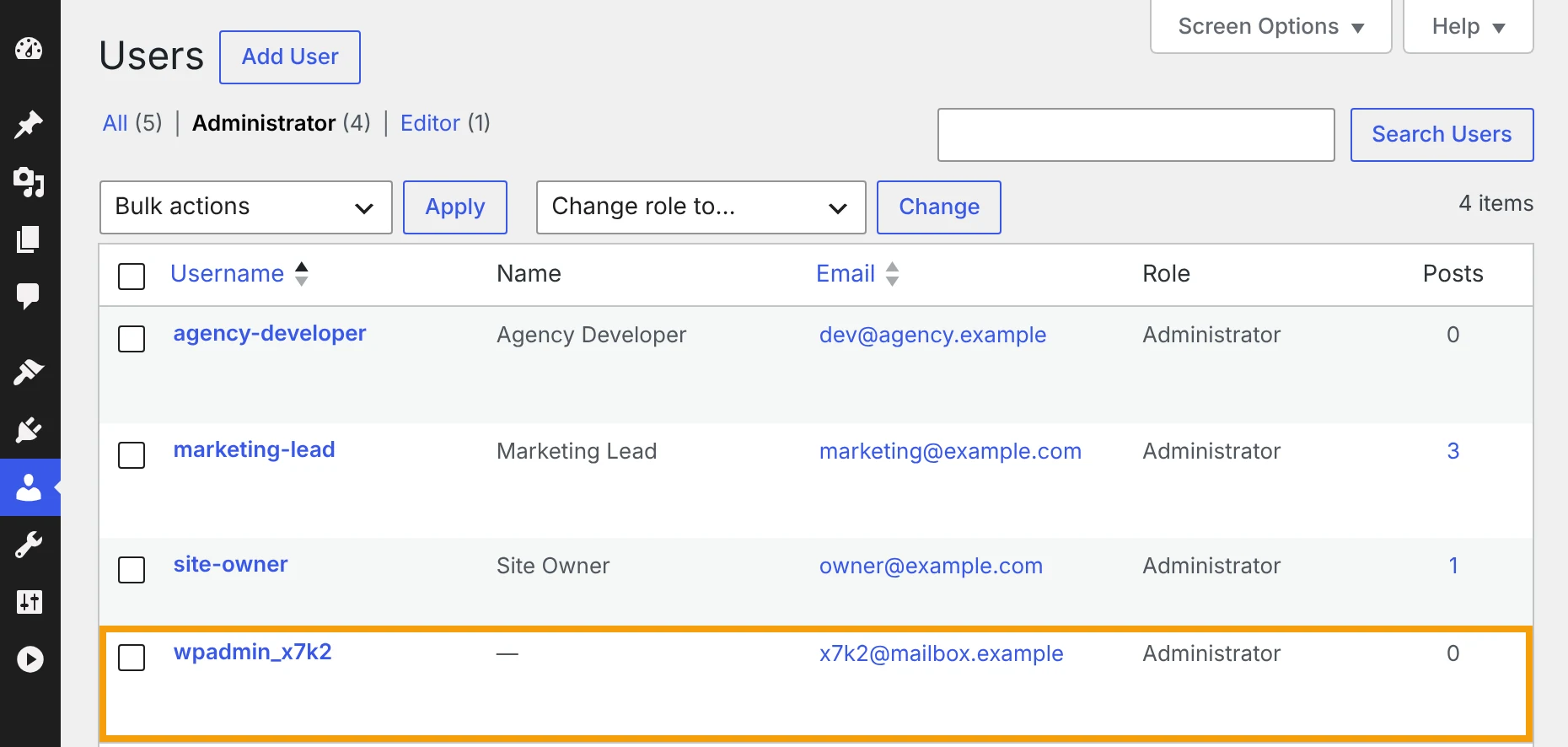
Unknown Admin Accounts and File Manager Plugins: Hidden WordPress Risks to Check After PHP2Shell
How to spot an unknown admin account in WordPress, what to do before you delete it, and why file manager plugins and the file editor put your site at risk.
Read article
Website Uptime Is Not Enough: What Businesses Should Monitor After Launch
Uptime is only the first check. Learn how to monitor forms, checkout, performance, analytics, SEO, accessibility, integrations, and other critical website journeys.
Read article